ACK Maps Studio
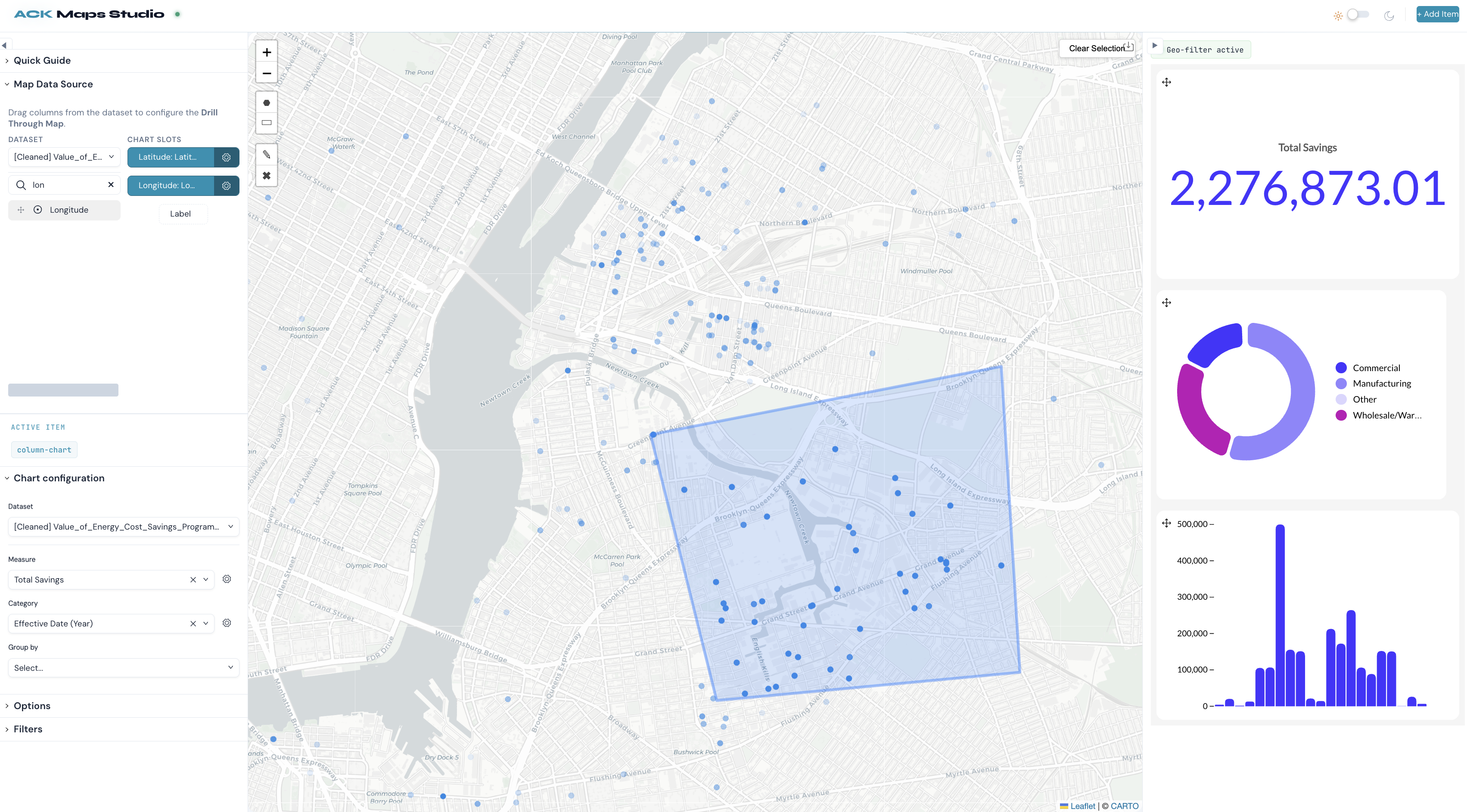
A geographic drill-down dashboard pairing a Luzmo custom chart map with a configurable dashboard for spatial drill-down analysis powered by ACK.
Created by Luzmo.
Flex
ACK
React
Custom Chart
Editing
Maps
ACK Maps Studio
A geographic drill-down dashboard that pairs a Luzmo custom chart map with a configurable Luzmo dashboard. Select regions on the map to filter every chart on the dashboard — enabling spatial drill-down analysis powered entirely by the Luzmo platform.
Features
- Custom chart map — Uses a Luzmo custom chart (
drill-thru-map) embedded vialuzmo-embed-viz-itemfor interactive geographic visualization. - Cross-filtering — Select areas on the map and all dashboard charts automatically filter to that region via Luzmo's filter API.
- Drag-and-drop data configuration — Configure the map's data slots (Latitude, Longitude, Label) by dragging columns from a dataset panel to a drop panel.
- Dashboard editor — Add Luzmo chart types (bar, line, column, table, etc.) into a grid layout; configure each item's data, options, and filters in a collapsible right panel.
- Collapsible panels — Both the left (data config) and right (chart config) panels collapse to maximize screen space.
- Theme toggle — Switch between light and dark themes across the entire UI.
- Lucero design system — UI built with Luzmo's Lucero components and icons.
Tech stack
- React 19 + Vite
- Luzmo Custom Charts —
drill-thru-mapcustom chart rendered via@luzmo/embed - Luzmo ACK —
@luzmo/analytics-components-kit(grid, data panels, edit components) - Luzmo UI —
@luzmo/lucero,@luzmo/icons - Turf.js — point-in-polygon and bounds calculations
Prerequisites
A Luzmo account with:
- Embed authorization (auth key + token)
- The
drill-thru-mapcustom chart deployed to your Luzmo environment - A dataset containing latitude and longitude columns
Environment variables
Create a .env in the project root:
| Variable | Description |
|---|---|
VITE_LUZMO_AUTH_KEY |
Luzmo embed auth key |
VITE_LUZMO_AUTH_TOKEN |
Luzmo embed auth token |
VITE_LUZMO_API_URL |
(Optional) API host, default https://api.luzmo.com |
VITE_LUZMO_APP_SERVER |
(Optional) App server, default https://app.luzmo.com |
Install and run
npm install
npm run dev
Open http://localhost:5173.
Build for production:
npm run build
npm run preview
How to use
- Configure map data (left panel) — Drag columns from the dataset panel to the chart slots: Latitude, Longitude, and optionally Label. The map renders automatically.
- Drill down by region — Select areas on the map to filter. All dashboard charts sharing the same dataset will update to reflect the selected region.
- Build a dashboard — Click + Add Item to add charts below the map. Arrange them in the grid by dragging.
- Configure chart items (right panel) — Select a dashboard item to configure its data, display options, and filters (including date pickers).
- Collapse panels — Use the arrow buttons on each panel to collapse/expand and free up screen space.
Project structure
src/
├── App.jsx                  # Layout, state, collapsible panels
├── main.jsx
├── index.css                # Global and theme styles
├── components/
│   ├── Header.jsx           # Theme toggle, Add Item, Save
│   ├── LeftPanel.jsx        # Draggable data fields + drop panel for map slots
│   ├── MapView.jsx          # luzmo-embed-viz-item (drill-thru-map custom chart)
│   ├── DashboardEditor.jsx  # luzmo-grid with cross-filters from map
│   ├── RightPanel.jsx       # Chart config panel wrapper
│   ├── ChartConfigPanel.jsx # Data/Options/Filters for selected dashboard item
│   ├── AddItemDialog.jsx    # Chart type picker dialog
│   └── ThemeToggle.jsx
├── hooks/
│   ├── useLuzmoAuth.js      # Reads VITE_LUZMO_* env vars
│   ├── useLuzmoData.js      # Map slot config, column mapping
│   ├── useMapData.js        # Selection state, bounds (Turf.js)
│   ├── useDashboardItems.js # Dashboard items CRUD, grid positions
│   └── useTheme.jsx         # Dark/light theme state
└── data/
    ├── itemTypes.js         # Chart types for Add Item dialog
    └── demoPoints.js        # (optional) fallback data
License
Private. See your organization's terms for Luzmo and dependencies.
Good decisions start with actionable insights.
Take your data products to the next level with Luzmo.